Home / Statistical Tools / Hypothesis Tests / Tests For Median / Kruskal-Wallis
Kruskal-Wallis test
From Excel click...
QXL Stat Tools Tab > Hypothesis Tests > Tests for Median > Kruskal-Wallis
| Test type: | Median |
|---|---|
| Data: | Quantitative |
| Number of Variables: | 1 |
| Number of Groups: | 2 or more |
| Assumptions: | Two or more samples from continuous distributions |
The Kruskal-Wallis test is a hypothesis test used to compare the medians of two or more samples. The null hypothesis is that the medians are equal.
The Kruskal-Wallis test expects two or more samples from continuous distributions with the same shape. It is similar to one-way ANOVA but for medians instead of means. If samples include outliers, the Mood's Median test should be used.
Hypothesis tested:
| H0 : | Median1 = Median2 = ... = Mediann |
|---|---|
| H1 : | Mediani ≠ Medianj |
where Mediank is the population median.
Step #1: Select data source for Kruskal-Wallis test.
Data for the Kruskal-Wallis test can come from an Excel spreadsheet or SQL data source.
See source data formats and example data for the Kruskal-Wallis test.
Step #2: Options.
-
'Decision Criteria' option (default = 0.05). The value of the decision criteria (significance or α level).
-
'Show Box plot' options. Display box plot along with hypothesis results.
-
'Display mode' option. When the 'Verbose (long)' option is on, Quantum XL will display additional text that explains the hypothesis test results.
Example
Three testers have measured the time to load the same web pages. Our intent was to check if there is a difference between load times.
-
Open Kruskal-Wallis worksheet.
-
Run Quantum XL > Hypothesis Tests > Tests for Median > Kruskal-Wallis.
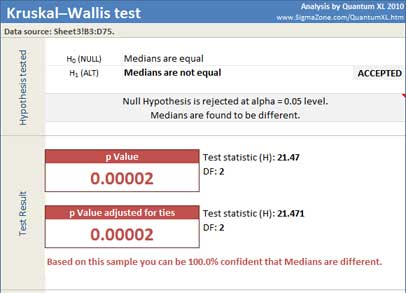
Quantum XL will display test statistic, degrees of freedom, statistics per sample and p Value.
Since the p-Value (.00002) is less than the decision criteria (0.05), the null hypothesis can be rejected. We can draw the conclusion that the medians are different.
Update
The Kruskal-Wallis test is updatable. After you create the analysis, you can change its data source or add new data to the data source and simply update the analysis.
-
Update: Quantum XL > Statistical Tools > Update Sheet
-
Change settings: Quantum XL > Statistical Tools > Modify Chart/Analysis