Home / Statistical Tools / Hypothesis Tests / Power And Sample Size / Power test for Paired t-test
Power and sample size for Paired t-Test
From Excel click...
QXL Stat Tools Tab > Hypothesis tests > Power and Sample Size > Paired t-Test
This test is used to perform power and sample size analysis for paired t-Test.
Step #1 -- What to calculate
Quantum XL can calculate one of the following parameters, when the other two are provided:
- Sample size (the sample size is for each group).
- Power of the test.
- Difference between the population paired means. This is also known as the effect size.
Step #2 -- Provide known parameters

After telling Quantum XL what to calculate, you need to provide the other two parameters. For example, if you are interested in sample size, you will have to provide Power of the test and the Difference (effect size).
Parameters can be entered as a single value (default), or you can provide a range of values. In order to provide a range of values:
-
Click 'advanced input mode' button.
-
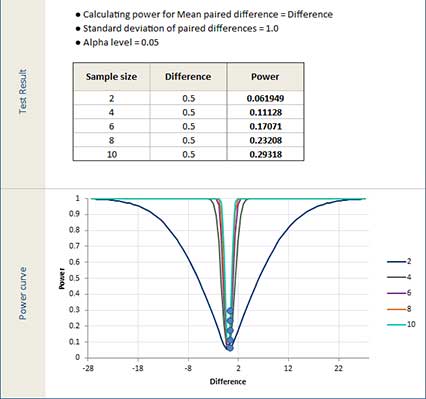
Enter 'From', 'To' and 'Step' values. Example: If you enter the following values for sample size, 'From'=2, 'To'=10 and 'Step'=2, Quantum XL will perform calculations for sample sizes 2, 4, 6, 8 and 10.
Quantum XL will report results for all combinations of the provided values. If you have provided 5 sample sizes and 2 differences, Quantum XL will report 10 power values. Maximum number of results is 100.
Limitations:
-
Minimum sample size is 2. Each number you enter for sample size or each value that is calculated for sample size is for each group.
-
Power values must be greater than 0 and less than 1.
-
If sample size is being calculated, difference must be:
- not equal to zero for 'not equal' test.
- less than zero for 'less than' test.
- greater than zero for 'greater than' test.
Step #3 -- Standard deviation
Enter the estimated standard deviation of the paired differences.
Step #4 -- Alternative hypothesis
'Advanced options' tab allows you to select between one sided and two sided tests.
- Not Equal. Perform two sided test. Alternative hypothesis is that the Mean is not equal to 0.
- Less than. Perform lower-tailed test. Alternative hypothesis is that the Mean is < 0.
- Greater than. Perform upper-tailed test. Alternative hypothesis is that the Mean is > 0.
Step #5 -- Alpha level (decision criteria)
Alpha level is a probability of committing type I error. The greater the value, the greater the power of the test.
Default value is 0.05.
OUTPUT
Quantum XL will report results for all combinations of the provided values. Report includes table with Sample Size, Effect Size (Difference), Power and Actual power values, and a power curve. Power curves graph has Effect size on the X-Axis and Power on the Y-Axis. One curve is plotted per sample size.