Home / DOE / Create Designs / Two Level Factorial Designs
Two Level Factorial Designs
From Excel click...
QXL DOE Tab > Create Design > Create 2-Level Factorial Design
Full and Factorial Designs can be created by selecting QXL DOE Tab > Create Design > Create 2 Level Factorial Design.
Using the grid below, you can easily choose which type of Design to create. The left side of the grid is the "Number of runs" and are available in powers of 2 (e.g., 22, 23, 24, ...). The top of the grid is the number of factors (inputs) for your design.
To select a design, click on the box at the intersection of the factors and runs. For example, to create a 22 Full Factorial click on the Green box with the word "Full" in column "2" and runs "4".
Designs in green are resolution V or higher. Designs in Yellow are resolution IV. Designs in red are resolution III.
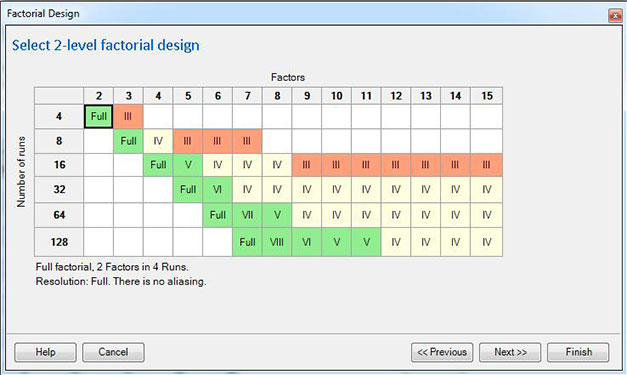
Procedure: Find the column with the number of factors for your experiment. The available designs will be in the column. If your objective is to execute a Resolution V design, then follow the column down to find the first resolution V design.
Example: We have 5 factors for our experiment. The first green square in the "5 Factors" column is for 16 runs.