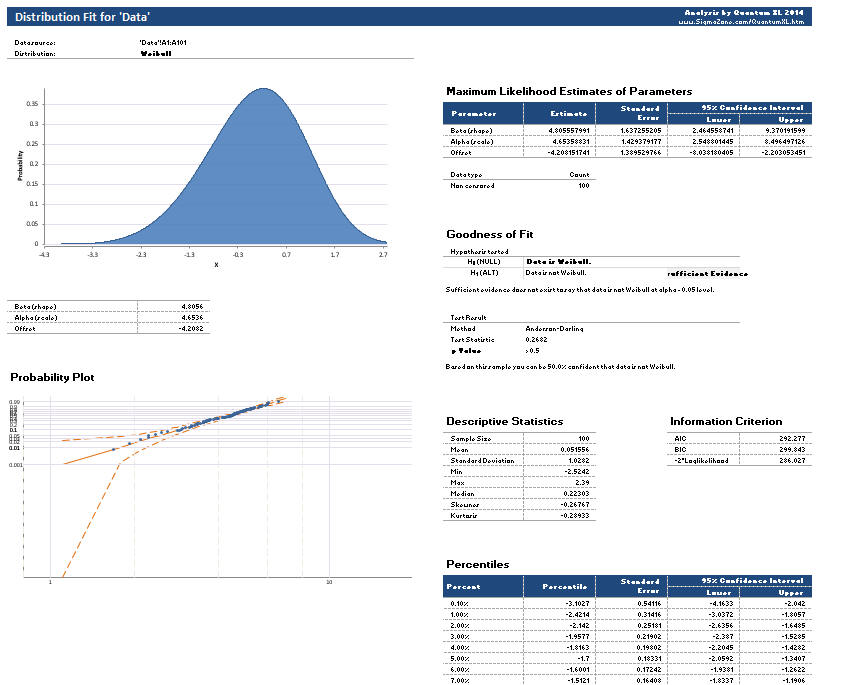
Home / Statistical Tools / Distribution Fit/Calc / Distribution Fit / Distribution Fitting (Non-Reliability)
Distribution Fitting (Non-Reliability)
From Excel click...
QXL Stat Tools Tab > Distribution Fit/Calc > Distribution Fit > Choose Distribution
Quantum XL supports fitting the following distributions: 2-Parameter Normal, 1-Parameter Exponential, 2-Parameter Exponential, 2-Parameter Logistic, 2-Parameter LogLogistic, 3-Parameter LogLogistic, 2-Parameter LogNormal, 3-Parameter LogNormal, 2-Parameter Weibull, 3-Parameter Weibull, 2-Parameter Gumbel/Smallest Extreme Value (SEV), and Johnson Distribution. Auto-Fit will analyze your dataset, fit all of the available distributions, and then present the results in rank order.
Step 1: Prepare data for Analysis
The data should be in a single column as in the example below
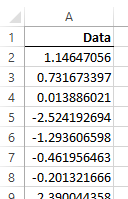
Step 2: Select QXL Stat Tools Tab > Distribution Fit/Calc > Distribution Fit > Distribution Name
Step 3: Select the Data Range Which Includes Your Data
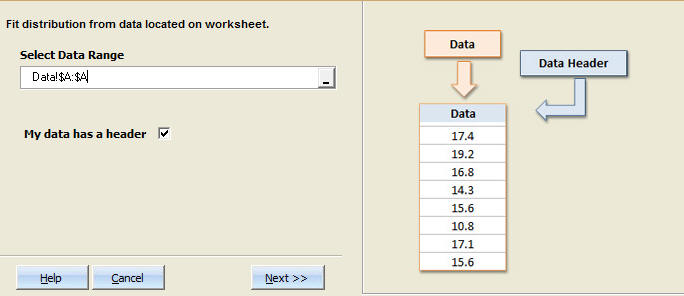
Step 4: Choose Options
If you provide specification limits, Quantum XL will calculate the area out of specification. Change the confidence interval for the resulting analysis (optional). If you wish to have a hazard and survivor plot created, check the checkbox (optional). When you're done selecting the desired options, click on the "Create reports for selected distributions" button.
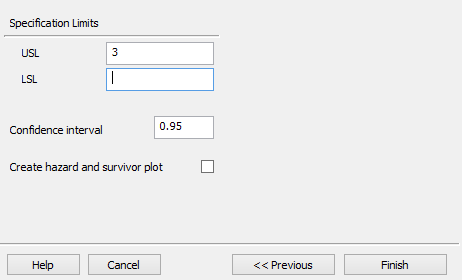
Specification Limits (Optional): If you enter the Upper and/or the Lower Specification Limit, Quantum XL will calculate the associated probabilities in the report.
Confidence Interval:The resulting report will include confidence intervals for estimated parameters. The default value is 95%, but you may enter any value greater than 0 and less than 1.
Create hazard and survivor plot: If you would like hazard and survivor plots, check this box. Note: see Quantum XL's reliability fitting options.
Step 5: Click "Finish"
Quantum XL will generate the desired report. The distribution fit report includes several sections. See Understanding Distribution Fitting Results for more information about the analysis.