Home / DOE / Additional Information / Power and Sample Size Calculation
Power and Sample Size Calculation in DOE
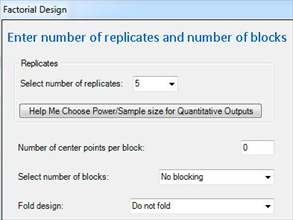
Power/Sample Size calculations are dependent on the "effect", standard deviation, design type, and blocks. When you get to this point, the type design (full vs. fractional factorial) and number of blocks should already be set.
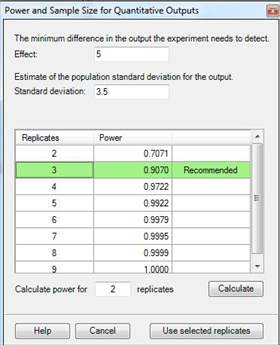
Effect: The effect is the minimum difference you want to detect in the output. For example, if your output is "Temperature" then you need to decide the minimum temperature change you would like to detect. Assuming that 1 degree is trivial but 5 is meaningful, then you would choose "5" as the effect.
Standard deviation: Power calculations are dependent on the variation in the output. You must provide an estimate of the standard deviation in the process.
Quantum XL will automatically calculate the power for multiple replicates and present these in the table above. Quantum XL will "recommend" the fewest replicates which will provide Power greater than or equal to .9.
How to Interpret Power: Power is a direct measurement of Type II Error. For more information, see the subject Understanding Type I and Type II Error. In general, Power = .9 means that you have a 90% chance of detecting a change in the output as large as the "effect".
Note
Power is also affected by alpha or Type I Error. Quantum XL uses alpha = .05 for power calculations.
Quantum XL will calculate the power for some of the designs. Look for a "Help Me Choose" button near where you define the number of replicates. If the button is available, then power calculations are available.