Home / DOE / Create Designs / Plackett-Burman Design
Plackett-Burman Design
From Excel click...
QXL DOE Tab > Create Design > Create Plackett-Burman Design
Plackett-Burman Designs can be created by selecting QXL DOE Tab > Create Design > Create Plackett-Burman Design. All Plackett-Burman designs are two-level designs.
Select Plackett-Burman design
Quantum XL supports Plackett-Burman designs from 12 to 48 runs. The number of runs must be larger than the number of factors.
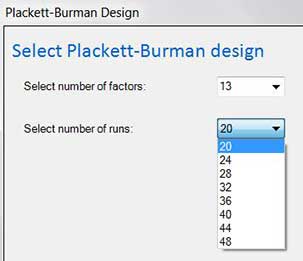
Select number of factors: Use the drop down box to select between 2 and 47 factors. Note that it would be odd to use a Plackett-Burman on 5 or fewer factors as a Full or Fractional factorial would provide more information for similar (or less) resources.
Select number of runs: Select the number of runs in the design. Note that Quantum XL will remove infeasible options based on the number of factors. For example, in the drop down below, the user has 13 factors. The 12 run Plackett-Burman is not shown as an option as it lacks sufficient rows. Generally, experimenters will choose the smallest design (fewest runs) that will provide the desired number of factors.
Enter factors names and coding
Click here for more information...
Define Outputs (responses)
Click here for more information...