Home / Statistical Tools / Analysis Tools / Correlation And Covariance / Pearson
Pearson's Correlation Coefficient
From Excel click...
QXL Stat Tools Tab > Analysis Tools > Correlation and Covariance > Pearson's Correlation (Normal)
Calculates the Pearson's Correlation Coefficient between two datasets. Pearson's Correlation makes the assumption that the data is normally distributed. If it isn't, then use Spearman's correlation coefficient.
Step #1: Select data source for Analysis.
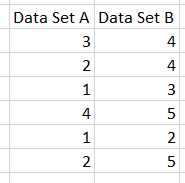
Data for Pearson's Correlation Coefficient must come from Excel (not SQL source). Below is an example of two datasets ready for analysis.
Step #2: Press Next or Finish
Quantum XL will calculate Pearson's Correlation Coefficient.
In this case, the Pearson's Correlation Coefficient is 0.7561. The p-value results from simple linear regression between the two datasets. The (1-p)*100% is the percent confidence that the two datasets are correlated.
Understanding Pearson's Correlation Coefficient
Pearson's Correlation Coefficient can range from --1 to +1. A correlation of +1 would indicate perfect correlation between two variables.
A correlation coefficient of +1 indicates "perfect correlation". An easy way to visualize this would be to plot the two datasets on a XY grid. If a single straight line can connect all of the data points and that line has a positive slope, then the correlation coefficient is +1.
If the line intersected every point and had a negative slope, then the correlation coefficient would be --1. A correlation coefficient equal to zero would indicate there is no correlation between the two datasets.
For more information about the p-value, see the help topic on Scatter Plots.