Home / DOE / Analyze / Regression
Run Regression
From Excel click...
QXL DOE Tab > Analyze Design > Run Regression
You can analyze a design with regression by selecting QXL DOE Tab > Analyze Design > Run Regression.
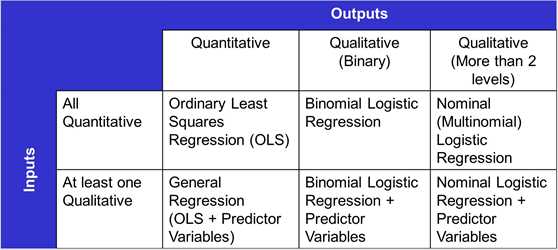
Quantum XL calculates the correct type of regression for Quantitative, Binary, and Nominal outputs. The type of output affects the analysis performed. Quantitative outputs are analyzed with Ordinary Least Squares (OLS) regression. Binary outputs are analyzed with Binary Logistic regression. Finally, Nominal outputs are modeled with Nominal Logistic regression.
Analysis Methods In Quantum XL
-
Quantitative Outputs: Outputs which are a direct measurement, such as temperature, pressure, and humidity. For more information on Quantitative vs. Categorical see this section. Quantitative outputs are analyzed using Ordinary Least Squares (OLS) Regression.
-
Binary Outputs: Binary outputs are categorical which have two possible results. Examples are Male/Female, Pass/Fail, and Right/Wrong. If there are three or more possible values then the output isn't binary. Binary outputs are analyzed using Binary Logistic Regression.
-
Nominal Outputs: Nominal outputs are categorical outputs which can be two or more possible values. Examples include color (red, green, blue, orange), day of week (Monday through Friday), and Continents (Europe, Asia, North America, ...). Nominal outputs are modeled using Nominal Logistic Regression. Note: While technically you can perform Nominal regression on binary responses, it is preferred to use Binary regression.