Home / DOE / Additional Information / Options
Options
From Excel click...
QXL DOE Tab > Options
Create Design
Variations When Creating New Design
Changes the way in which the Designs are created. Note in the example below, when "Last Factor Changes First" the sequence for C is -1, +1, -1, ... However, when First Factor Changes First the sequence for A is -1, +1, -1, ....
| Last Factor changes First | First Factor Changes First |
|---|---|
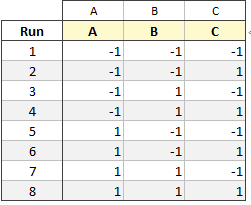 |
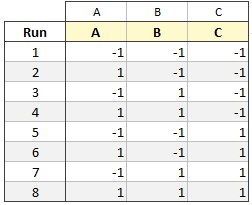 |
Run Order for New Design
Chose to randomize the runs or leave them in the default order.
| Standard | Random |
|---|---|
|
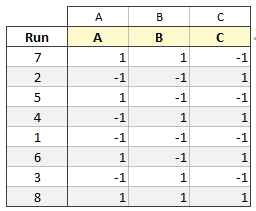 |
D-Optimal
D-Optimal Algorithm Settings
Force the Federov algorithm: The Federov algorithm provides a better determinate for fewer runs, but takes much longer.
Run the modified Federov at end: The modified Federov algorithm can be used at the end of a sequence to make the result better. There is a small time penalty for running the modified Federov.
Number of seconds to look for initial design before giving up: The D-Optimal algorithm must start with a random selection of the existing design. The algorithm will try for this long before giving up. One second is sufficient for nearly all problems.
Regression Settings
Display Comments in the Regression Sheet: Turn on to have Quantum XL display popup help for the regression table statistics (see VIF example below).

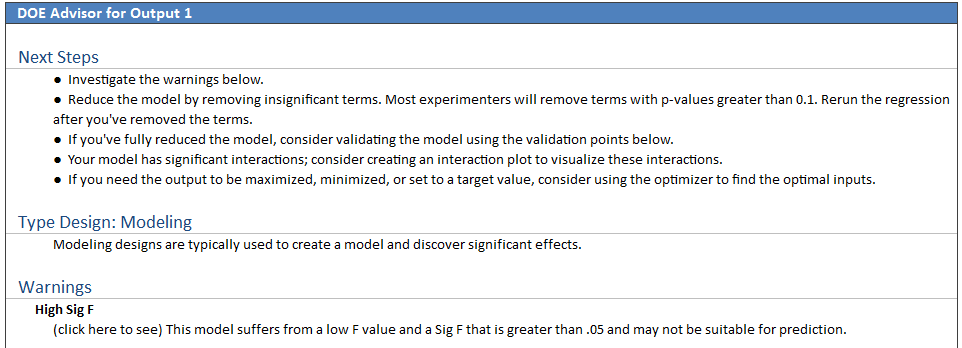
Display DOE Advisor on Regression Sheet: True to include the DOE Advisor. See example below.
Show P-Value for the Uncoded Regression: By default, when displaying the Uncoded regression, Quantum XL turns off the p-values.
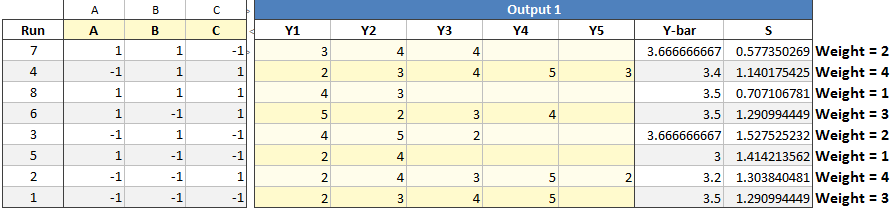
Use Weighted S-Hat Regression: When building the S-hat model, the results can be weighted based on N-1 where N is the number of replicates in that row. In the example below, the first Run has three replicates thus has a weight = 2. These weights are then used in Weighted Least Squares Regression. If you disable this option, then all rows will be weighted the same regardless of the number of replicates.
Hierarchy Warnings: By default Quantum XL will warn you when you violate hierarchical modeling. An example would be to include the "AB" interaction without including both the main effects A and B.
Normal: Checks for main effects only. For example, if the ABC interaction is included in the model, Quantum XL will warn you if A, B, and C are not included. However, Quantum XL will not warn you if AB, BC, and AC are not included.
Strict: Checks for main effects and interactions. For example, if the ABC interaction is included in the model, Quantum XL will warn you if A, B, C, AB, AC, and BC are all not included.
None: No warnings are provided.
Charts Settings
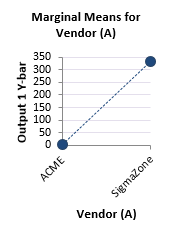
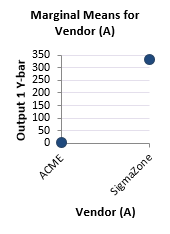
Categorical Factors: Choose whether to include a dotted line between the points in plots for categorical variables. In the example below, the factor can only be "ACME" or "SigmaZone" (values in between are nonsensical). The dotted line is included by default to help you see the magnitude in difference, but is optional.
| Display dotted line | Do not display line |
|---|---|
 |
 |